Palm Pre, Will it Save Palm?

Palm Pre

There was another big announcement from last week’s Consumer Electronics Show that I have purposely held off commenting on. Palm announced their next generation phone, the Pre, and their new WebOS. The tech media has been touting this device as the best announcement of this year’s CES. Full disclaimer: I have owned and used a Palm device since the year 2000, which is one of the reasons I’ve been holding off on this post. I watched the palm keynote, and was extremely excited about this device, and wanted to let the hype wear off before commenting on it. I also wanted to wait until I could get my hands on everything that has been written about this thing to date, and not just drink the “Ooo-purdy-new-phone!” kool-aid. Well, I’ve been sitting on this for a few days now, and can honestly say I’m still very excited about this phone. That said, there are still many things we don’t know yet, but from everything I’ve read out there, this thing seems to be the real deal.

So what’s so great about this thing?

Hardware
Some people love the look of the Pre, some people think it’s kind of ugly. Personally, I like it. It’s got a nice organic shape, the rounded corners are everywhere, from hardware to software. Plus, the best part about this thing, it has a hardware keyboard. Like I mentioned above, I’ve had several Palm phones, the first cell phone I ever bought was a Treo 300, and I’ve upgraded to future Treos from there (300>600>650>755p), so a hardware keyboard is important to me. I could probably learn to use a software keyboard (ala iPhone), but if I’m torn between two exact phones, and one has a hardware keyboard, I’d probably prefer to go that route. I also really like how it gracefully slides out of the phone. Most of the navigation, and simple day to day activities can probably be accomplished with the touch screen, but when I need to type an email or txt message, it’s really nice to have the ability to slide out a full keyboard. The other nice is the touch screen (ha!). It extends below the screen’s viewable area (around the silver button at the bottom) for a gesture area, which is a vital part of the user experience. Otherwise, the hardware on this device is what you’d excpect from any modern smart phone.

  • High-speed wireless (EV-DO Rev. A or HSDPA, depending on version)
  • 802.11b / g WiFi with WPA, WPA2, 801.1x authentication
  • 3.1-inch 24-bit color 480 x 320 display
  • Built-in GPS
  • Bluetooth 2.1 EDR with A2DP stereo Bluetooth support
  • 3 megapixel camera with LED flash and extended depth of field
  • 3.5mm headphone jack
  • 8GB of internal storage (~7.4GB user available)
  • MicroUSB connector with USB 2.0 Hi-Speed
  • Proximity sensor for detecting when phone is near face
  • Light sensor to automatically dim display
  • Ringer mute switch
  • Removable rechargeable battery
  • Width: 59.5mm (2.3 inches) Height: 100.5mm (3.9 inches) Thickness: 16.95mm (0.67 inches)
  • Weight: 135 grams (4.76 ounces)

This device has only just been announced, so these hardware details could still change before it becomes available.

Software
One of the things that palm has been working on for quite some time is their transition from their old tried and true PalmOS (Garnet) to a new Linux-based OS (codenamed Nova). They have been talking about this transition for several years, and have been plagued by delays, leaving many to wonder if it was vaporware. So, with their existing PalmOS getting extremely long in the tooth, Palm had to come forward with something truly amazing, or be prepared to curl up and slowly die. To tell you the truth, I was fully prepared for the later of those two options. I heard about the announcement at CES, but was ready to be underwhelmed. My phone contract is up in May, and I was ready to leave the platform for the first time in almost 10 years. Palm had been sitting dormant for way to long. There were too many players jumping ahead of them starting all the way back with Microsoft eating away at their handheld market (before they even started making smart phones). Now with the smart phone market really taking off, with iPhone, Android, Windows Mobile as the big players, it was hard to see how Palm could even think about taking that lead back (for some interesting history on how Palm whittled away their lead in this market, Engadget has some good historical perspective). Given all of that, Palm definitely came out swinging, and is definitely prepared to compete on the same level with the iPhones and the Androids already out there, maybe even pushing the bar a little higher. Nova, now officially named WebOS is definitely an impressive step forward.

The WebOS has some really cool things going for it, but again, we only know what Palm has told us, so until these get into people’s hands, it’s still up in the air. The interface on the Pre looks really impressive. Palm seems to have really taken the time to think through how you can and should interact with a handheld device. There has been a lot of thought put into using the Pre with one hand, for instance, if you touch and hold in the gesture area and then slowly move up the screen, you’ll get a floating quick launch-like bar of your favorite apps. These types of usability tweaks seem to be scattered throughout the entire OS. I guess this makes sense given that Palm pretty much invented the handheld interface, and these types of decisions are in their DNA. On top of the well thought out interactions, the UI design is beautiful. It looks like a modern smart phone.  Some other nice software features are true multitasking. Palm has created a great interface for multitasking on the device. They metaphor they use is a deck of cards spread out on the Pre’s “desktop” representing all of your open applications. You can flick through them, reorganize them, or close them all from one place. You can also set up a card or instance of the same application open multiple times. An example of this would be several cards of the browser application each open with a different website (kind of like a tabs interface in modern browsers). Another nice software feature in WebOS is how it handles alerts. Say you get a txt while you are writing an email message, or browsing the web. WebOS doesn’t take focus away from the task you’re in the middle of, it simply puts a small icon, or partial screen of the alert letting you handle it however you want. I think one of the truly great features of WebOS is how it uses the web (appropriately named eh?), or cloud to manage calendars and contact (and possibly more – we’ll see). The way this works is you’ve got contacts in all kinds of places on the Web (Gmail, Facebook, etc.). WebOS takes all of these collections of contacts and figures out where there are duplicates, or where a contact represents the same person, and brings it all into one place on the Pre. So if I have a contact on the device, and it sees there is a record of the same contact in facebook, yet maybe the Facebook contact has a different phone number not listed with the original, it pulls all that information together into one place. It does the same thing, pulling calendars together from across the web. If I have a work calendar on Exchange and a personal calendar in Google, it let’s me see it all together in one place on the Pre. I’m sure there are things I’m missing, but so far this software (what we’ve seen of it) looks really amazing. To see a good video demonstrating more of the UI, PreCentral.net has a great video of the device on their site.

There is one more piece of all this having to do with software. How difficult will the Pre be to develop for? That again, is a tough question to answer since many of the details haven’t been released yet. Palm claims that it will be very simple to do though, given the development environment is pretty much just web development. Palm has said it is all based on HTML 5, CSS, and javascript, and that everything they’ve demoed thus far was created using just that. The development environment was/is also a piece of whether or not this thing flies. Like I mentioned above, there are quite a few smart phones out there already established, all having their own development environment. Adding yet another way to make apps for a smart phone would just dilute that developer community more, most likely leaving Palm without quality apps. Choosing to go with technologies that millions of developers already know and use on a regular basis was very smart on their part. There is already a huge community out there to make apps for this new device. That does leave a few questions though. Exactly how powerful will this environment be given that it just uses web technologies. I think most common things can be created, but more complex development might take a bit more. A good example, and one were Apple’s iPhone really shines, is in games. It would most likely tough to create a well-made 3d game, like you see all across the iPhone App store with only web tools to do it with. It would some lower level access to the device to be able to do that. Maybe that will happen, it is still too early to tell what exactly Palm has up its sleeve. My guess is that most developers will be able to use the common web development environment to do what they need. For anything beyond that, I’m willing to be that Palm may have a little bit more complex SDK available, but with a few more hoops to jump through to get it.

Final Thoughts
I’ve mentioned several things that are cons on this device, but probably the biggest is we don’t know everything yet. Palm has been purposely tight-lipped on several things. What is the battery life on this thing going to be? At least they have a removable battery (yes, I’m looking at you when I say that iPod/iPhone!), but am I going to have to swap batteries in the middle of the day? How much is this going to cost? Palm is partnering exclusively with Sprint for the launch, which is fine with me since I use Sprint, and will have a contract end in May, but we don’t know how much this bad boy is going to run. Rumors say from $149-199 with a new contract or extension to $399-$499 without. If they’re smart they will price this thing at or below the price of the iPhone. Also, what kind of service plan will I need to use this? Will Sprint go AT&T on us and force us into a special (more expensive) Palm Pre plan? Will this thing only work with the cloud? The thing that makes this phone great is how well it works with the internet and data in the cloud. But, will it only work with the cloud? An example: I currently have an encrypted password application on my Treo that I sync between an encrypted password application on my desktop. This type of information I don’t want flying around the cloud, or being stored there. The cloud is great, but there is something to be said for a simply desktop sync when it’s called for. I guess we’ll wait and see how all of this lands. As we get closer to the release, (full) details of this device will finally make it into our hands.

Palm has been up and down a lot in their sordid history. They lead the way in the handheld market, and seemingly squandered it away over the years, building themselves up again with smart phone, but not without squandering that away as well. Before this announcement at CES, the death knells were definitely sounding for Palm. This was probably going to be their last time at bat, so they either had to hit it out of the park or lose the game. I think they did that with the announcement of the Pre and WebOS. The technology press has been a buzz since the keynote. I haven’t read much negative news about this thing. Some even call this thing an iPhone killer. I think saying that has become a little cliche lately, but if any device has a chance, I think this one does. Will I go right out and buy one of these when my contract is up? I doubt it. I like how it looks currently, but there are a lot of nice smart phones out there right now, and by the time I’m ready for one in a few months, who knows how much the landscape will change. I’m very impressed with the Pre, and what Palm has done, but we’ll have to see how it all looks when this device actually hits the ground.

Soft Fruit and Fresh Cola Mentos from France

Some new Mentos arrived in my mailbox the other day from my aunt and uncle (they’re now Mentos Ambassadors BTW). They send a couple 4-packs from France. One was a flavor I’ve had before, Soft Fruit (fruits rouges). The other was a new flavor I’ve not seen before, Fresh Cola. I’m always excited to get rare Mentos, but am especially excited when they are flavors I’ve never seen before. After a few photos, I opened up the fresh cola package and gave it a  try. The color of these candies is definitely brown (even though the photos make it look a bit orange). It’s a color of Mentos I’ve not ever seen. They are an interesting flavor to say the least. I don’t think I’d say it tastes like Coke or Pepsi, or even RC Cola. It tastes like… artificial cola flavor, like they tried really hard to make it taste like cola, but keep it sweet. I think cola is one of those awkward flavors that is hard to duplicate outside of the actual (liquid) thing. It is a sweet flavor, but also a bit tangy. I’m not sure if the tanginess is to try and mimic fizz, but it definitely isn’t a smooth flavor like the mint variations. There is virtually no aftertaste. These remind me a lot of the gummi cola bottles I had as a kid. There must be only one flavor our there for cola candy. Fresh Cola Mentos fits into the same category as the licorice flavored variety. They are definitely an acquired taste (which is probably why they aren’t sold in the US). So they at the bottom of the Mentos scale, but even the very last player on the Mentos scale is still head and tails above all other candy… c’mon they’re Mentos, the candy of the gods!

Asus Announces Eee Keyboard

Asus, the company that started the whole netbook trend announced a cool new product yesterday. It’s called the Eee Keyboard, and is an entire computer (HTPC) built into a keyboard.

Asus Eee KeyboardThe keyboard has a built-in touch screen where the number pad normally goes, which can display widgets, RSS feeds, calendars and more.  This thing will supposedly connect via wireless HDMI, making it a perfect little HTPC that can be carried from room to room, or TV to TV. Unfortunately this is only a prototype, and no official release has been announced, so who knows when or even if this thing will make it to the market. If it does, it look to be a pretty sweet little keyboard… err computer.

ASUS Press Release – Eee Keyboard
Being the first multi-media center enabled by ultra wideband HDMI, the Eee Keyboard is not only a fully-functional PC; it also serves as a hub that wirelessly connects all multimedia devices to utilize any monitor or TV as a viewing platform.

More info and photos:

Happy Birthday Doom

One of the original, first person shooters turns 15 years old today. The video game Doom was released by ID Software in December of 1993 (a follow-up to Wolfenstein 3D). I don’t think I started playing Doom until the summer of 1994, when a friend (who had spent the time downloading it on a painfully slow 14.4 modem) gave me the pile of floppy disks to install the game. At the time, it was one of the best games out there, and had incredible graphics. We’ve definitely come a long way. Since ’93, Doom has been ported to just about every platform you can think of, including a recent flash version that you can play in your browser. What better way to wish Doom a happy birthday than by blowing up some aliens!

2008 Holiday Gift Guides

theme.gifA happy Cyber Monday to you all! I started putting together lists of (geek) gift guides mainly for myself a few years back to help with my holiday shopping. So with the shopping season now officially upon us, here’s this years list. I’ve chosen these lists because they appeal to me, and the people on my shopping list. If you happen to know of any other guides that might be appropriate there, be sure to leave me a comment, and I’ll get them added to the list.


Auditorium Flash Game

I just spent about a half hour playing this beautifully designed (and addictive) flash game, Auditorium.

The game is all about directing a stream of particles using small spheres that redirect them in different ways. You want to get the particles running through audio containers that play different parts of the beautiful soundtrack in the game. I guess this game is just a demo so far (only 3 levels). The developer promises up to 20 levels when this thing is done. Take a play, it will be tough to stop.

Gifty Gift Cards from Target and Best Buy

It’s quickly becoming that time of the year where you’re looking for those perfect holiday gifts. Gift cards are always an option for those hard to buy for people on your list. Best Buy and Target have just come out with new gift cards with some interesting extra features. Target now offers a gift card (for $50 or more) that is also a digital camera. Best Buy, not to be left out also has a dual featured card with a mini headphone jack that can also be used as speakers. I’m sure the secondary functions of both these cards (outside of buying merchandise) are pretty low quality. I guess this the gift(card) that truly does keep on giving.

Happy Hallowii’n (late)

A little late on this, but here’s a few shots of our geeky pumpkin.

War of the Ads – Apple vs. Microsoft


Warning: Undefined property: stdClass::$pageInfo in /home/techoryc/public_html/blog/wp-content/plugins/fluid-video-embeds/fluid-video-embeds.php on line 681

Warning: Attempt to read property "totalResults" on null in /home/techoryc/public_html/blog/wp-content/plugins/fluid-video-embeds/fluid-video-embeds.php on line 681

Warning: Undefined property: stdClass::$pageInfo in /home/techoryc/public_html/blog/wp-content/plugins/fluid-video-embeds/fluid-video-embeds.php on line 681

Warning: Attempt to read property "totalResults" on null in /home/techoryc/public_html/blog/wp-content/plugins/fluid-video-embeds/fluid-video-embeds.php on line 681

Apple has been dinging Microsoft with its “I’m a Mac” ads since 2006. Microsoft recently decided to strike back with a 300-million-dollar campaign and some very odd ads starting Bill Gates and Jerry Seinfeld. Then they released some “I’m a PC” ads with content hitting back at Apple, which I have to admit (after the crazy Seinfeld ads) actually was decent response. Well, now the ad war is on bigtime. Apple hit back with some ads about the ads criticizing their ads. This is going to get confusing (but funny!) before it’s all said and done.

UPDATE: There’s another one…

http://www.youtube.com/watch?v=SVqcF9XowV8

What Firefox Extenstions do you Use?

I catch a new article every few weeks along the lines of “The Best Firefox Extensions for Doing ______.” Sometimes I see something cool that I end up downloading and using regularly, but most of the time I just stick with what I’ve got. I decided to share the list of extensions I have installed, and what I use them for.

Aardvark
This extension fits into the web developer category, and is really handy for quickly visualizing block elements in a website layout simply by hovering over the page.

BugMeNot
If you’ve never visited the site Bugmenot.com, you’re missing out. That site provides generic logins to those silly sites that make you create a login just to view things. This extension gives you an easy right-click option to pull a generic login from Bugmenot to the site you’re currently viewing.

Chatzilla
This one is simply an IRC client for Firefox. The main reason I installed it was for viewing Apple Keynotes chatted via IRC, so it isn’t an extension that I use regularly.

ColorZilla
This is another web developer extension. It gives you an eye-dropper tool that can be used to pull colors from any website, and copy them to your clipboard. I use this pretty regularly to quickly get hex colors from sites I like, or to remind me what color I used in a site I created.

Delicious Bookmarks
I’ve got a Del.icio.us account full of bookmarks, and this extension helps me to add/tag/sync those bookmarks with Firefox.

Firebug
Firebug is probably the most used extension in my collection. It fits into the web developer category, and allows you to rip up the code to just abou any website you can pull up in Firefox. I use it mainly for tweaking and viewing CSS issues in my sites, but it does a whole lot more.

Foxmarks Bookmark Synchronizer
This extension keeps my bookmarks in sync between my work and home computers. It also provides a hosting service allowing me access to my bookmarks via their website on any computer.

Greasemonkey
This extension allows you to customize the way webpages look and function by using scripts to do different tasks based on the sites you visit. One of my favorite scripts removes hose annoying text link ads from sites that use them.

IE Tab
This one does pretty much what the name implies. It shows you what your site would look like in Internet Explorer. It’s handy for testing sites, but also if someone has a poorly developed site, it will allow you to quickly view it using IE without leaving Firefox.

Link Alert
I use the Link Alerty extension to warn me before I click on a link to an outside document. Where this extension is most handy is for PDF’s, so I don’t mindlessly click, and then have to wait for Acrobat to open. It’s also handy for e-mail links warning me when it is going to pull up my email client.

MeasureIt
Yes, another web developer extension (I’ve got a lot of them). This one lets you draw boxes around elements on a site to see how larget they are. It’s handy when looking at page/element widths.

S3 Firefox Organizer
This is my newest extension, and was downloaded when I started using Amazon’s S3 for backups. This extension gives me access (FTP-like) to my S3 storage account from inside Firefox.

Sage
A simple in-browser RSS reader – I like this better than the live-bookmarks reader built into Firefox.

Translator
This extension does quick and easy translations of websites with one click, Every now and then, I’ll run across a site I need to see that isn’t in English – this extension saves me in those circumstances.

User Agent Switcher
Along the same lines of IE Tab, this extension lets you spoof your user agent for those poorly developed websites that only work well in a certain browser.

Web Developer
The Web Developer extension is a very handy extension for web developers (duh), that provides different break-downs of page elements on the site you have it. It also allows live manipulation of those page elements.

WebMail Notifier
The WebMail Notifier extension notifies you when you get new webmail (catchy name eh?) so you don’t have to keep visiting the webmail sites one by one to check mail status. I use this for my hotmail, yahoo and gmail accounts.

Work-Only Extensions:
There are a few additional extensions that I use only on my work computer for various reasons.

Quartz PDF Plugin
Since Preview is my PDF-viewer of choice on my Mac, Quartz lets me open PDF’s using Preview right inside the browser vs. firing up an external instance for each doc.

Simple Mail
This extensions is similar to WebMail Notifier, but is used to check my pop mail accounts at work. I like to keep my work and home email separate, so my home mail doesn’t go to my mail app at work. This extension check my multiple accounts and lets me view/edit/send mail from right inside the browser.

Well, there’s the list of all the extensions I use. What does your list look like? Is there anything I should be using that I don’t have right now? What is your favorite best-extension-since-sliced-bread?

Control Video Games With Your Mind


Warning: Undefined property: stdClass::$pageInfo in /home/techoryc/public_html/blog/wp-content/plugins/fluid-video-embeds/fluid-video-embeds.php on line 681

Warning: Attempt to read property "totalResults" on null in /home/techoryc/public_html/blog/wp-content/plugins/fluid-video-embeds/fluid-video-embeds.php on line 681

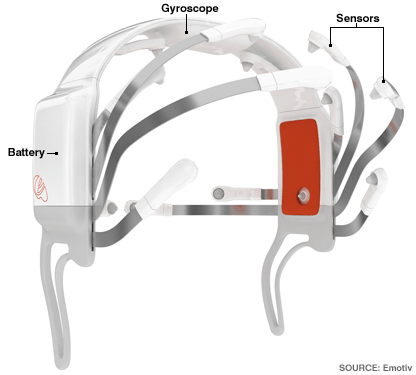
I read a small blurb in Wired Magazine about a company called Emotiv Systems that has created a really interesting product called the EPOC. It basically brings brain control to your computer or to video games. The EPOC is a headband helmet type thing that actually picks up your brain waves allowing you to interact with a video game or a computer simply by thinking about it. The videos make the interactions look very simplified in their demo games. There is also an emotion sensing piece to it as well – you smile, and your avatar smiles, you frown, so does your avatar. Given the simple demos, I’m willing to cut them some slack since it’s just a version 1 product, and it’s freakin’ brain wave control for crying out loud. They’re promising a release date before the holidays this year, and the price is only $299, which seems really cheap for brain control. This thing looks like it is has some promise, and when this thing is out, we’ll see how developers take advantage of it. I can’t wait till I don’t have to manipulate a keyboard and a mouse to run around an blow things up in my computer games. This is just one step closer to putting you inside the game.

Internet Connected Toaster

You knew something like this would happen sooner or later. Someone has gone out and created a toaster that you hook to the internet. The toaster pulls down news stories and burns it to your bread so you can read as you eat, I guess. It can also toast images to your bread. It’s kind of a cool idea, but I don’t’ know how practical. This crazy new home appliance is actually a finalist in a design competition so you can’t go out and buy one of these yet… but I’m sure the day is coming.

Mentos + Diet Coke in Zero G


Warning: Undefined property: stdClass::$pageInfo in /home/techoryc/public_html/blog/wp-content/plugins/fluid-video-embeds/fluid-video-embeds.php on line 681

Warning: Attempt to read property "totalResults" on null in /home/techoryc/public_html/blog/wp-content/plugins/fluid-video-embeds/fluid-video-embeds.php on line 681

Ever wonder what would happen if you tried the infamous Diet Coke and Mentos experiment in Zero G? Robert Woodhead decided to take that experiment to the skies… literally. He packed up an experiment kit (Mentos, Diet Coke, containment bag) and took off in a special ZeroG plane to get weightless.

the hypothesis that we wanted to test was that convection of the soda was an important part of the whole reaction; under normal gravity, bubbles formed around the mentos rise up through the soda, allowing more soda to come in contact with the candy, and thus more bubbles form. However, in microgravity, there’s no “up”, so any bubbles that form will just stay near the mento, and will in fact keep new cola from reaching it.

Best Unboxing Video EVER!


Warning: Undefined property: stdClass::$pageInfo in /home/techoryc/public_html/blog/wp-content/plugins/fluid-video-embeds/fluid-video-embeds.php on line 681

Warning: Attempt to read property "totalResults" on null in /home/techoryc/public_html/blog/wp-content/plugins/fluid-video-embeds/fluid-video-embeds.php on line 681

This is probalby the best unboxing video I’ve ever seen. It is for the Samsun Omnia i900 phone. It seems that it was actually created by Samsung, to go viral… and it sure has. I’d totally buy this phone if it came like this!

Demo of MS Photosynth Composing App


Warning: Undefined property: stdClass::$pageInfo in /home/techoryc/public_html/blog/wp-content/plugins/fluid-video-embeds/fluid-video-embeds.php on line 681

Warning: Attempt to read property "totalResults" on null in /home/techoryc/public_html/blog/wp-content/plugins/fluid-video-embeds/fluid-video-embeds.php on line 681

Microsoft Research at The Univeristy of Washington has put together a really amazing new demo of thier Photosynth Composing Application. It takes large collections of photos from many different users (i.e. flickr or smugmug), and builds a 3D environment out of those photos by stiching them together at various locations and depths around the subject. Then filters are placed on the images to adjust the colors to make the movement through them more fluid or remove all the day shots or night shots so the resulting movement doesn’t jerk back and fourth through dark and light photos. There is a great video on YouTube demonstrating the process and what’s possible with this software. This is really cool, and I can’t wait till it’s available on a wider basis.