This is Part of Jon’s HTPC setup. For more, see: Introduction and Table of Contents
DVD Catalog:
 Meedio also allows me to have a searchable catalog of all our DVD movies. You can search alphabetically, by genre, by studio, by rating, by actor, or by director. All movies have front and back cover art, a description, rating, run time, and other information. I use a piece of software called “DVD Profiler” integrated with Meedio to accomplish this. Currently it’s simply a catalog that you can search through to pick a movie; selecting the movie doesn’t actually play it on demand. However if I wanted to put my entire DVD collection on the hard drive I could then have them launch by selecting it. I just don’t have enough hard drive space to store all of our movies. Currently we just browse the catalog until we find something we are in the mood for, and then pull it our of the big DVD wallet.
DVD Profiler software…
http://www.intervocative.com/dvdpro/Info.aspx
A Quick Note On Audio:
Windows uses something called the “kmixer” for all directsound and waveout audio (pretty much 100% of the audio on a normal system). Kmixer is BAD… very bad. It forces re-samples (a.k.a. mangles) all the audio that goes through it. That means if you have a 192/24 sound card like the Audigy 2 ZS, you are not actually getting 192/24 sound. The same is also true for 44/16 CD audio. The only way to get around the Windows mangler (kmixer) is to find programs that allow you to use either an ASIO connection to your soundcard, or “Kernel Streaming”, or a SPDIF connection to your soundcard (that might look like a typo, but I’m referring to a software SPDIF connection to your soundcard, not a wired SPDIF connection from the soundcard to the receiver). How you connect the soundcard to your stereo is up to you, personally I use Monster analog connections because 192/24 won’t fit through a SPDIF cable. But regardless, in order to bypass the mangeler the connection from the software to the soundcard needs to be ASIO, SPDIF, or Kernel Streaming. Most DVD playback software has the ability to use SPDIF, so no problem for DVD’s. However it can be a bit harder to find music playback software that supports ASIO or Kernel Streaming. Luckily, Meedio supports ASIO playback, so your MP3’s, WAV’s, and CD’s will sound like they are supposed to. Another nice feature, so no worries there.
The more MP3’s you have, the bigger the need for quality organization. That means that all your ID3v2 tags need to be correct. There is simply no automated way to do this. Like I said earlier, I use EAC and LAME to rip everything. EAC has (like a lot of programs) and automated CD information finder thing, but in reality that’s only a starting point. For example, one CD might come up as “Elwood – Parlance of Our Time” and another might come up “Beatles, Abby Road”. As you can see, the titles might be correct but the formatting is different. Also, many times the track numbering is 1,2,3 on one CD and 01,02,03 on another, and 01/14, 02/14, 03/14 on yet another. So again, things don’t match. Often times the CD release date is empty or wrong, and yada yada. To make it even worse, Various Artist CD’s are a headache in themselves. I highly recommend “The Godfather” for editing your tags so everything is nice and formatted correctly. I previously used Mp3tag (for a long time), but then switched to The Godfather. It’s not as friendly to use as Mp3tag, but it’s more powerful. Regardless of what software you use, there’s no automated way to do it; it’s simply a mind numbing CD-by-CD process. However, The Godfather helps to make it as easy as it can be. A big advantage to The Godfather is that it supports custom VBScripts to help speed things up. My collection took months to make corrections and format everything. But now that they are all correct, it’s easy to maintain new CD’s as they come in. The Godfather (using a VBScript) can also be used to embed the cover art into the MP3 file. Some programs require the cover art to be embedded in order to properly view it.
Bad kmixer! Bad!… (this is just one result from a Google search)
http://www6.head-fi.org/forums/showthread.php?t=77185
Software SPDIF vs SPDIF cable discussion… (the explanation is 5 posts down)
http://www.meedio.com/forum/ptopic25667.html
EAC software…
http://www.exactaudiocopy.de/
LAME encoder…
http://lame.sourceforge.net/
The Godfather software… (I can’t seem to find the homepage. Here’s a screenshot)
http://www.snapfiles.com/screenshots/godfather.htm
Next Chapter> Home Automation (the best for last)

 sorts of software, and most importantly they have hardware MPEG2 encoders built in. That means when you are recording TV shows it won’t slow down your computer. Also, the cards are top-notch quality. For a comparison, DVD’s are usually encoded at around 8 Mbit/s. These cards hardware encode at up to 12Mbit/s. The problem for me is that the cable signal coming into our house is really crappy. We’ve actually had the cable company out to look at it and they did something outside that helped a bit, but it’s still not very good. Oh well. Also, stay away from the ATI All-In-Wonder cards. If you want a headache give one a try, but in a few months I guarantee you will upgrade to a Hauppauge card. If you are looking to record HDTV content it’s going to be a whole other game. I haven’t personally tackled that beast yet, so I don’t have any advice. That takes care of the tuner card. Just like TIVO you can schedule shows to record once, or every time it airs, or every new airing, yada yada. You can skip commercials with the push of a button. You can fast forward, and rewind TV. The interface is also automatically available via a web server, so you can schedule your computer to record shows from anywhere in the world. You can also watch recorded shows streamed from your computer to anywhere in the world. Fun stuff. I guess the other big difference from TIVO is that with a computer you don’t have any monthly subscription fees. Once you buy the software that’s it. Another advantage is that the shows record to your hard drive as MPEG2 or WMV files, so when your hard drive gets full you can just burn them off to DVD-R discs. I usually wait until the end of a season then burn the whole season to DVD to save space. Another advantage to TIVO is that you can easily upgrade your hard drive space. With my settings, an hour of MPEG2 takes up 4 Gigs and an hour of WMV takes up 1 Gig. I have it set up to record everything as MPEG2 and then every day at 1AM the computer takes everything recorded that day and then re-encodes it as WMV to conserve space. My personal choice for software is Beyond TV (accessed through the Meedio front-end). It’s good software, but there is other good software out there as well. A major competitor is Sage TV and Windows Media Center Edition. Beyond TV works just fine, but I don’t have any die-hard loyalty to it.
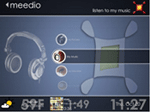
 That’s the default HDeeTV theme, I’ve customized mine a bit and I’ll include screen shots later. The key to Meedio is its expandability. Besides the normal built in features (pictures, music, yada yada) it provides the ability for users to create any sort of feature they can imagine. Check out the Meedio “Add Ins†area to check out things other users have done (and are available for download). Some of them include daily updated comic strips (you specify the comic), the ability to manage your Netflix account from within Meedio, alarm clocks, recipe libraries, wine organization tools, X10 control and tons more. I don’t use any of those features, but my favorite thing that I use daily is my AC3 Music Library. I have my normal MP3 Library (all 192khz or more ripped with EAC and LAME), but recently I’ve started collecting a higher quality AC3 Music Library as well. AC3 files are Dolby Digital files that I have stored on my hard drive that are high quality 5.1 audio recordings. I’ve got everything from Linkin Park, to Schumann, to Dave, to the Buena Vista Social club all in Dolby Digital 5.1 sound instantly accessible via the Meedio interface. For me, I think it’s a great feature. The point here however, is that if you can think of something you want, there is probably a way to incorporate it into Meedio. I didn’t say it would necessarily be easy, but it can be done. If you are looking for an easy to setup piece of software, Microsoft’s Media Center Edition is supposed to be pretty good, and I would guess Apple’s new Front Row software is pretty easy as well. However, neither of those will give you the flexibility of Meedio.
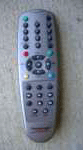 The user interface can be whatever you want it to be. I have a wireless Gyro Mouse and wireless Gyro Keyboard that have a 30-foot range. The mouse is great for the living room because you don’t need a surface to use it. You just pick the mouse up and move it around in the air. It has sensors inside that detect your motion and the mouse moves on the screen like your hand is moving in the air. It takes a bit of getting used to, but it works pretty sweet. The mouse and keyboard are only used for regular windows function. To control the home theatre stuff, the computer has an IR receiver than plugs into the serial port. The Hauppauge PVR’s come with an IR remote that you can use for whatever you want. When I first got the remote I wasn’t a big fan because it’s small and has some toy’ish looking buttons on it. But eventually I grew to like the simplicity of it. Anyone is comfortable using it. On the flip side, I few years back I bought a nice big touch-screen remote and initially liked it, but grew to hate it. I still have it, but the only thing it’s used for is the volume control. The simple little Hauppauge remote handles all other functions. There are several problems I have with the touch-screen remote. First, it requires two hands to use. Second, you don’t get any tactile feedback (on the little remote you can feel the button depress and then come back up). And third, everyone who visited would need a lesson on how to use the darn thing. The little remote is just friendlier. However, this is completely just user preference. Some people love touch-screen remotes. As long as you have an IR receiver for the computer, you can use whatever you want.
 My friend Jon (the one that bought me

 Apple just relased a big batch of new stuff, including the rumored
 Gmail just added a really handy feature to their web-based e-mail system. How many times have you been typing a message in Gmail and then had your browser crash, or you accidentally bump the back button, or some other horrible thing happen that made you lose your entire message. Luckily It hasn’t happened a whole lot to me, but really just one time is enough. I’m not sure when it was added, but Gmail has recently

