Best Buy Prices: In Store vs. Web Site

I experienced something a few weeks ago while shopping at Best Buy. I looked up the price/availability of a flash memory card on their website and seeing that it was available and cheaper than any other local stores (needed it right away – couldn’t wait for shipping), I drove down to the store. I scoured the camera and flash memory section and couldn’t find the card for the same price as I saw it for online. I asked around and the Best Buy associate told me that the one on the shelf was the same one I saw online. I told him I had just looked it up, and it was cheaper on their website. He told me to wait there and he’d go look it up. When he came back he said that I was right and mumbled something about it not being up to date yet which I thought was weird since I’d looked up the price a few times in the past 3 days and it hadn’t changed. How long does it take to update the prices in the store? Not wanting to talk to him any more, I marched up to the checkout, and the item rang up to the higher price. Hmm, not updated on the shelf OR in the computer system either. I guess it takes a while for the prices to get changed there too… right? I told the cashier that I had just spoken with someone back in the camera section and that it should the lower price. He had to bring over a manager and the manager had to call back to associate #1 back in cameras and finally they charged me the lower website price.

Recently I’ve run across a few other stories about this proving that this occurrence wasn’t unique to me.
Best Buy not your best buying experience
Best Buy Not Always Best Buy

I guess the moral of the story is: When shopping at Best Buy, always check their website before you purchase something in the store because it may be cheaper.

Cool New Tools from Yahoo!

Yahoo has been hard at work lately and has some handy new tools in beta.

The first one is called Yahoo! Mindset, and allows you to customize, or lean your search results in a certain direction. It works with the typical Yahoo search box, but the results page presents you with a slider allowing you to shift the focus of the search to either “researching” or “shopping” meaning either more academic or more commercial. I guess it really depends on what you’re searching for as to how useful this would be. There are many topics where I couldn’t really see the grey area between researching and shopping, but others there is an obvious separation. If anything it’s kind of fun to play with.

The other tool that I just discovered (don’t know how long it’s been out there) is “Yahoo! Farechase“. It is similar to the other travel search sites, in that it finds the best deals on hotels, flights, rental cars. The place where Farechase shines is that it brings many of the results from those other search sites and travel sites together in one place. When I need to book a hotel room or flight etc., I usually spend a good deal of time going from site to site trying to find the best deal. Farechase lets me do all that in one place, on one site. I’ll probably still do some cross-checking on prices, but from my initial searches, it seemed to bring back the same, or better deals than the other sites. Yahoo lists the sites that Farechase searches. Hopefully this list will continue to grow adding to the options and potentially improving the prices. Give Farechase a try the next time you need to book a travel reservation.

Point and Click Games

LazyLaces has put together a great collection of Point and click games. You know the ones, where you have to um… point and click. I’m sure you’ve all seen the games where you really don’t have any instruction and just have to point and click (yes, again) until you find all the secret hidden areas to take you through the game. Even if you have no idea what I’m talking about, it’ll make sense once you’ve given a few of them a try. Have Fun!

Half Life 2 Dominos Mod

Somebody has built a Half Life 2 map of a huge domino setup. Using the Half Life physics engine, this domino course is built out of doors and pieces of metal from the game. The falling dominos travel all over the map until they finally smash an old guy at the end. Appropriate for a domino setup created in a shoot-em-up game, no?

Half Life 2 Domino Mod

Find Cheap Gas With Google Maps

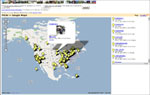
Google Maps GasSomeone else has gone and done something really cool using Google Maps. There is now a cheap gas site where you can click and drag yourself all over the United States and see the locations and prices for the cheapest gas (regular or diesel). This site takes its price and location data from an already useful site called GasBuddy.com and makes it even better.

Star Wars Last Supper

Since tonight will be my last supper before going to see the new Star Wars Movie I thought this image was appropriate (yet still a little disturbing). I’m taking off work tomorrow to see Episode III (yes I know, I’m a geek!). We’ll be catching an afternoon show at the closest THX certified theater in Des Moines, and we’ll be all geeked out in Star Wars T-shirts (Jess is going with the Princess Leia hair!). Be sure to check the mobile phone photo gallery tomorrow for what I’m sure will be some lovely shots of us and a bunch of other Star Wars geeks waiting in line.

Star Wars Last Supper

Greasemonkey

Recently I’ve seen a bunch of articles on the Firefox extension, Greasemonkey (Slashdot, Wired, misc. blogs) lately and thought I’d join in with my own praise of this really neat tool. I’ve been using GreaseMonkey for a while now, and it is kind of one of those tiny novelty things that just makes life a little bit easier while you’re surfing the web.

Greasemonkey is a Firefox extension that allows you to change how a webpage is laid out in your browser with simple DHTMLgmail delete scripts. It works similar to the CSS model where you can change little things or add little things to a page with and external script. I’ve found a few that I use regularly. One of the most handy is the “delte button for Gmail” script, which does just as it says and adds a delete button to the Gmail interface (why they don’t have one there by default is beyond me). This handy Greasemonkey script is just one of hundreds available to change how the sites you visit are presented. A few more that I have found really helpful are scripts that turn off ads in weather.com, and one that turns off the big full-screen ads on ucomics. Another fun one, called Book Burro, will bring up a little price comparison window when you view a book at several online bookseller sites.

If you want to give Greasemonkey a try, it’s really simple to get up and running (you must be running Firefox):

  1. Download and install the Greasemonkey extension.
  2. Restart Firefox
  3. Find some scripts to install – GreaseMonkey User Scripts.
  4. Follow the script link to the javascript code page.
  5. Select “Install User Script” under the Tools menu in Firefox.
  6. Visit the site that the script you just installed is supposed to modify.
  7. Rinse… Repeat!

200th Mobile Photo

As of last Sunday night there are now 200 photos in my Mobile Phone Pics gallery. It all started on October 20th, 2003 at 3:52 PM with a shot of my computer monitors at work taken with my first camera phone . Before you go exploring, be forewarned, it’s really random!

Earbud Replacement Foams

earbudsI was kicking myself last week because I lost one of the foams on my earbuds. So one ear was comfortable and one was uncomfortable while I listened to music. After a little digging, I found some forum posts in an iPod forum listing several places to get replacements. This afternoon I ran out to RadioShack and checked out their selection. For $2.99, you can get a package of four replacement foams that work just as well as the original ones. So if you lose the original spongy things from your earbuds, the RadioShack replacements will definitely do the job.

2005 Webby Award Nominations

Webby AwardsDo you have a computer in front of you with a connection to the ‘net, and some time to kill? Check out this year’s Webby Award Nominations, and vote for your favorites in a large collection of categories.

  • Connections
  • Entertainment
  • Features
  • Living
  • Marketplace
  • Media
  • Services
  • Society

There are some pretty cool sites out there to dig through.

Good Eats

Alton BrownSince I dropped cable a little while back, I’ve been enjoying my new IP-TV, and especially all of the additional channels that I now get. Taking a look at my new viewing habits, out of all those channels, I really didn’t realize how much I missed the Food Network. Back when I lived in Coralville, I had extended basic cable (including Food Network), and I dropped down to basic (a.k.a. almost no real channels but about 20 shopping networks) when I moved to North Liberty last August. Now that I’ve got more channels than I know what to do with, I find myself watching a lot of Food Network: someUnwrapped, and a lot of Alton Brown’s Good Eats.

What is Good Eats you may be asking yourself. Well, it is sort of a cooking show for geeks. I was first turned on to Good Eats after reading an article in Wired Magazine. Since I enjoy cooking, and am a self-proclaimed geek (note: geek does not mean nerd!) it’s no surprise that I enjoy this show. Basically it is similar to any other cooking show in that there is usually a theme or a specific ingredient and they teach you how to make something. Where this show differs is that the show’s host, Alton Brown, not only shows you how to cook something and gives out the typical recipes, but Alton shows the science behind the food and tells you what exactly is happening when you mix something, or cook something. For instance in the “I Pie” episode, Alton has a gigantic model of a slice of Lemon Meringue pie to explain how the meringue sometimes gets yucky and slides around on top of the custard layer.

With Phase 1 of construction well under way, its time that we ponder Phase 2. Now here’s a fact: this device [points to pie] needs to be assembled while that base custard is piping hot. That means we’ve got no choice, but to make phase 2 the meringue. And that’s tricky business because a meringue is really nothing but a foam. And what is a foam after all, but a big collection of bubbles? And what’s a bubble? Its basically a very flimsy little lattice work of proteins, draped with water. Now in the case of meringues we’ve got some advantages. We add sugar to the structure which strengthens it. But things can, and do, go wrong.
[noticing balls of ‘water’ on top of the pie model] Mmm, hmm. Hmpf. Just as I suspected. Beading. This is what happens when sugar-saturated water oozes up to the surface of the meringue and sets in the open air. Probably means we’ve got trouble downstairs too.
[pulls back meringue layer to reveal ‘water’ between the custard and meringue] Oh, yes. Look at that layer of water. Well, let’s just pretend its water. Its a model, okay? This is the same moisture as we had up there. Only since there was no air, it didn’t set into beads. But this is even worse, because it means that the meringue layer and the custard layer will never stay bonded together. Luckily, this can be prevented.

See what I mean… the fun that is the science of cooking. I think you can probably see that Alton is a geek too (he also has a blog).

Good Eats will show even those culinary challenged folks how to create a delicious dish without problems since the recipes are broken down to the very very basics. Well, now you’re probably just itchin’ to make something in the kitchen (ha… that rhymed), but what happens if you don’t get the Food Network? Well, all of the Good Eats Recipes are available on the Food Network site or you can also purchase episodes on DVD. There is also an incredible fan site that includes all the recipes, show scripts, screen grabs, and a special Good Eats Humor section.
Enjoy, and bon appetite!

New Techory.com Spring/Summer Theme

Summer ThemeWinter has been over for a while now, and yet the winter theme stayed put. I’ve finally found some time to create a spring/summer theme for Techory (and remove the winter theme!) You can change the theme (like always) by clicking on the colored swatches in the upper right hand corner of the page (the one on the end with the flower is the spring/summer theme). Enjoy!

Adobe Buys Macromedia

Macromedia + AdobeAdobe announced today that they will buy Macromedia for $3.4 billion!

I’m very torn about this purchase. I really like Macromedia as a company and the applications that they produce. I also like Adobe’s applications. I just don’t know if I want them coming together. They both have their own areas of expertise and if they start to merge products together it will become a big mess.

Macromedia makes products geared for the web. Dreamweaver is the most popular HTML editor on the market, and is head and tails above anything else out there. Flash pretty much has the web animation market cornered. Fireworks is great for putting together quick easy web graphics. Adobe has in the past attempted to take away Macromedia’s web market with their own tools. ImageReady for web graphics, LiveMotion for web animations, GoLive for HTML publishing. I’ve tried every one of these products and they really just don’t cut it when compared to Macromedia’s offerings. What scares me is that Adobe may attempt to bring in elements of these applications and wreck an already great Macromedia product. I’m also a little worried that Adobe will hurt Macromedia’s website and support. Macromedia site (despite the fact that it is created entirely in Flash) is an incredible resource with help notes and updates going as far back as the software’s original release. There is a great (very active) forum area that is monitored by Macromedia staff. Adobe’s support and website pale in comparison. I really don’t want to see such an incredible resource for Macromedia get gobbled up in Adobe’s poorly executed attempt. Don’t get me wrong, Adobe has some great products of their own, PhotoShop (the industry standard for photo manipulation), Illustrator, Premiere… etc. I wouldn’t want to see any Macromedia stuff going into these applications either.

My (totally uninformed guess) as to what lead to this merger is Adobe got a little scared of Macromedia’s movements into some certain key areas. They have started focusing a lot of attention into mobile delivery of flash content and their new FlashPaper. With the availability of Flash in just about every web browser out there, they could seriously start to hurt Adobe’s Acrobat format (which if you ask me, is big and slow and bloated), which is their big money-maker product. Plus with content delivery to mobile phones growing like is, the flash mobile player could hold a major position in that industry.

This merger will be interesting to watch. I just hope that these two companies together don’t start hurting each other’s products by trying to bring too many things together.