This past fall, I finally made the jump to Netflix (yah, I know… what took so long?!?) after paying something like $6 for a new release at the local video store. I had eyed the service for a while, but paying for that video was the straw that broke the camel’s back. Anyway, I’ve been very happy with the service for the past 6 months. Delivery is very quick, the website is very intuitive and works very well (they’ve got all kinds of cool AJAX stuff going on). All in all, Netflix has been great, and there isn’t a DVD that goes by where I regret making the move away from the local video store at all.
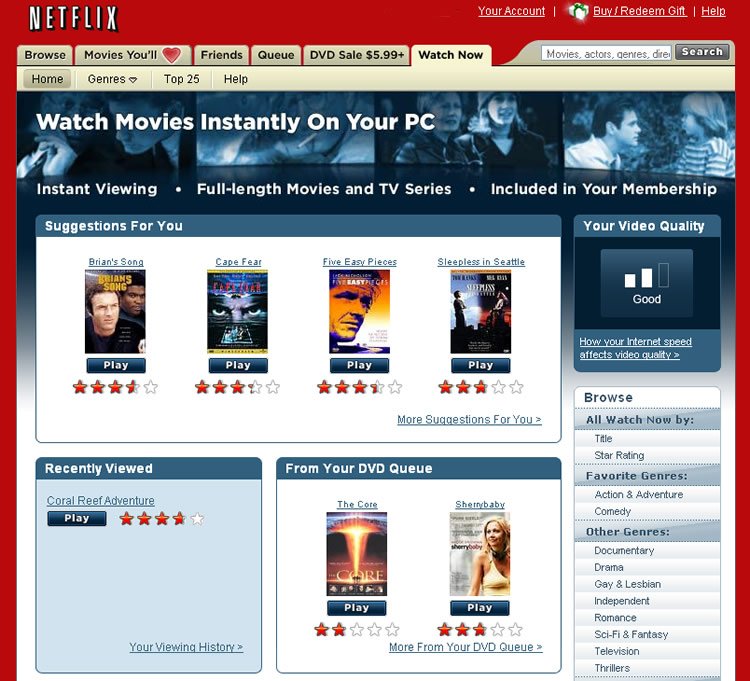
 Sometime around the middle of January, Netflix launched a trial of a new “Watch Now” service that allows you to instantly watch movies online via the Netflix site. Being the happy Netflix user that I am, I jumped at the chance to try their cool new addition. Well, turns out I wasn’t special enough to get to use it. I kept getting a message that the “Watch Now” feature would be rolled out on a limited basis and would be fully launched in June. You can image how disappointed I was. Then when listening to the Buzz Out Loud Podcast, I learned of a little trick to get myself into the limited release of the new “Watch Now” feature. If you log into the site and type “downloads” into the search bar, you’ll get a message (Looking for our instant watching feature?) that takes you to a page where you can activate your account for this new feature. Well, I did this, and kept getting the same “coming in June” message that I’d been able to find before… hmmm! Then after a little digging, I found another tip that said the new feature only worked in Internet Explorer, which I try to stay as far away from as possible. So I fired up IE and low and behold, it worked… almost. I had the new “Watch Now” tab in my menu, but trying to actually watch a video gave me several crazy Media error messages. Well, after a little digging and an e-mail to Netflix they got me straightened out. Turns out Netflix uses Windows Media DRM (IE & Windows only!) for this service and there were a few hiccups, but I seem to be straightened out now.
 Now that I’ve got the service up and running, things are working pretty well. The pricing is nice. Since you are obviously a Netflix subscriber if you’re trying this, the pricing is pretty much free. The new instant watching service is tacked onto your account as a feature. You get however many hours of video watching as dollars per month in your subscription. So if you have the 2 at a time unlimited subscription for $14.99/month, you get 15 hours of instant streaming movies per month. The movie selection is a little lacking. I’m hoping this is just due to the service still being in limited release. There are still a good number of movies available though. As for actually using the service, after the initial hiccups everything has been working smoothly. You pick the movie you want to watch and simply click the “play” button. It pulls up a new viewing screen with your typical video playback toolbar (also includes a full-screen mode) and after a few seconds to buffer, the movie streams to your computer. The quality is what you’d expect from streaming video. It’s not super great, but it’s really not that bad either. I’m sure much of the quality is dependent on your Internet connection speed. I’d like to try this out on an HTPC, and see how it looks on a TV screen, mainly because I don’t have a couch in front of my computer monitor.
So far I’ve been happy with this nice new Netflix feature, minus the fact that I have to use IE for it. It’s a nice add-on for a service that I already enjoy. I don’t think I would think as highly of it if there was an additional charge for viewing online. The fact that it starts streaming quickly (no waiting for a long download), and is available on just about any (windows) net connected computer is a really handy feature for Netflix. I could see taking advantage of this when I’m between mailed DVD’s or even on vacation, or at a friends house when we want to watch a movie, but don’t want to go out and get one. Netflix has definitely positioned instant watching well to making it very useful, and to get people to subscribe to their bread-and-butter online rental service. It easily blows the current collection of online streaming rental services (don’t get me started on Unbox again!) out of the water.
Hacking Netflix has put together a nice screencast of the entire “watch now” process.
 We were in downtown Austin last night and sitting at the balcony of The Blind Pig. I stepped away for a moment and when I returned, I was informed that a Mentos car was parked on the street below and there was a team of Mentos girls handing out rolls up and down the street. I’m sure my eyes must have popped out of my head when I saw the beautiful blue convertible with mints and logos posted all over it. I was giddy! I hurried downstairs as quickly as I could with Ken in tow (someone needed to take the photos!). We rushed down to the car and started shooting photos. We couldn’t find the Mentos girls anywhere so I reluctantly agreed to head back up. Then I got a call from Dave, one of the people we were sitting with, saying that the Mentos girls were back at the car. I couldn’t move fast enough! I think I inadvertently left Ken in the dust as I rushed back to the car.
 I have a love/hate relationship with Weather.com. On one hand, it’s easy to remember, and they usually have fairly accurate forecast information. On the other hand, they are LOADED with ads, and bury the information you’re looking for pretty deeply on their site. They obviously know they’re the #1 location for weather online and try to get as many ad views as they possibly can by making you dig to the data you’re looking for. They launched a nice feature the other day though, that I would put into the love category. They are now




 I always seem to be on vacation when Apple does their big January announcement. And since that happened over a week ago, (and since the media goes crazy any time Apple releases something new) there’s isn’t much of a chance you haven’t heard at least some sort of rumblings about the new
  The Google year end
  It has finally happened. I’m now the proud owner of a shiny green iPod Nano. I’ve used iPods since the first one was released way back when (we’ve used a couple of them at work), but haven’t ever had one of my own that I could load up with my music until now. I’ve lovingly named it Lola (she was a showgirl), and after putting it (her?) through its paces for a little over a week now, I’m really happy with it. There were a few things I had to get used to though.
