SimpleSeating.com

SimpleSeating.comSince I’m currently in the process of planning a wedding, I’m constantly looking for for technology that will make that job easier. For instance, we’re using a Wiki (that I loving call our WedWiki) to keep track of wedding information (links to decorations, food, tux/dress, to-do lists, etc). Last month I stumbled across a nice little web app called SimpleSeating.com that I thought would be very helpful when we get to the daunting task of creating a reception seating chart.

What is SimpleSeating.com?

  • SimpleSeating.com is the fastest and easiest way to make seating charts online.
  • SimpleSeating.com brings the power of expensive desktop seating chart applications to the web minus the learning curve.
  • With SimpleSeating.com you’ll be able to create, preview, and print your seating charts in just a few simple steps.

Well, I signed up for the beta account and jumped right in. For the most part, this little web app is pretty slick. It does everything they claim it does, and makes putting together a seating chart as easy as dragging and dropping. I’ll preface this review with the fact that this is beta software and there is room to grow. They’ve put together a blog listing future features and bug fixes as they happen. It looks like they’re really dedicated to making a great product and taking suggestions seriously. Many of the items I suggested have made their “coming soon” list. I’m really excited to watch this app work its way to a solid version 1 release.

You start out by creating an event, giving it a name/descriptions and selecting the number of guests for your event. From my trials, smaller events seem work a little better than larger events mainly because of space constraints on your banquet room layout. I started with a 200 person event (wedding?) and laying out the tables into a “room” was a bit cramped (though they did all fit).

SimpleSeating GuestsOnce you’ve placed your event tables (and there are a lot of table sizes to chose from), it’s time to start adding guests to the event. The interface for adding guests provides individual guests and also guest grouping options. Right now you can only add guests one at a time, but they say they’ll be coming out with some sort of bulk add in the near future, which I’m looking forward to (don’t really want to type 200+ names). There is also another nice guest feature where you can chose if a guest has RSVP’s yet or not and also a select a meal choice. The RSVP option changes the color of a guest’s icon on the seating chart so you can visually tell if they’re going to be there or not and move people around accordingly.

seating chartNow that you’ve got a room/table layout and some guests, it’s time too place them into their seats. This is the easiest part of the process. All you need to do is drag and drop little (RSVP color coded) people icons to the chairs around a table. If you’ve grouped someone, or created a party of say 3 people, it places all three little people icons when you drag that group/party to a table which is nice when you need to keep families or couples together.

Once you’ve created your seating chart, you are then able to print it out. I’m not sure how this works yet since they’re still working some bugs out of that portion. I’m hoping that there are a good number of print options to provide documentation for a banquet hall’s layout and seating.

All in all, this is a great little app, and I’m really excited to see it progress. Even with it still being beta software, I’ll be using it to create a seating chart for my wedding. According to their site, they’re planning a release in “October-ish.” I look forward to see where it will go between now and then.

Neuros OSD

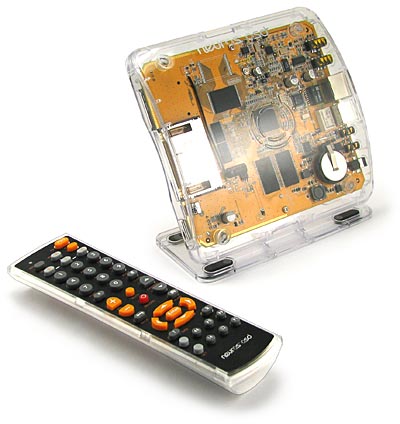
Neuros OSDAlong the same topic as a few of my last posts, I ran across a really cool piece of hardware called the Neuros OSD. I guess if you wanted to compare it to something, it’s similar to Apple’s yet-to-be-released iTV box with one major difference… it’s totally open. The machine runs open source Linux-based firmware, so it’s about as hackable as you can get. It looks like it will be able to do just about everything that was announced on the iTV. It can record video from any source and links to your PC, portable, flash cards, external hard drive, etc. The big question on this thing is really how the developer community takes it and extends it. Neuros has given the whole hacking process a kick start with several bounties for certain features. They’re offering the following bounties for developers who can create these features.

  • YouTube or Google video Browser
    Bounty: $1000
  • Flickr Photo Browser
    Bounty: $600
  • Implement a wireless remote using a WiFi PDA (or PSP) as the remote.
    Bounty: $500
  • TiVo style functionality for radio. Hook up the OSD to a FM/AM or Satellite receiver and do timed recordings or FF/RW and Pause Live Radio. Bounty:
    $700
  • Voip on the OSD. Plug a USB phone into the OSD and make calls without touching any of your PCs.
    Bounty: $500

Given the above cash rewards, hopefully this thing will take off. It’s strength is in the fact that it’s totally open. I’m not limited to what Apple, or Tivo, or Microsoft tell me I can or can’t do do with it. The Neuros OSD looks like a nice little piece of hardware, that (depending on how it matures) I think would probably chose over the iTV.

Leave Amazon Unbox in the Box

Amazon UnboxTo get the jump on Apple, Amazon released their movie download offereing (called Unbox) just days before Apple’s announcement last week. To kick off their launch they’re offering a free download ($1.99 instant rebate) for a TV show. I decided to give the new service a try (since the first one is free). I downloaded the software and then purchased (free after rebate) my favorite episode of Firefly to try out the system. So far so good, until I decide to fire up the Unbox downloader/player and actually try to watch the video. My newly purchased show would not download. I kept getting an undescript red-colored “Unable to Download” message no matter what I tried to do. After being frustrated with the system for half a day, I decided to dump the whole thing and uninstall it from my computer. I tried using the uninstaller for the app, but it wouldn’t go away. It would just hang on a pulsing bar telling me it needed to check my account. Well, I couldn’t watch my video, and I couldn’t get rid of the software so I lowered myself to contacting Amazon support. They do have a nice system where you put in your phone neumber and they contact you – I’ll give them that. After being on the phone for 30-45 minutes with a tech suport person, they were still unable to get my video to download or remove the software from my machine. They told me they’d contact me with an update, which they did a day later. They had me remove some application settings files and then the Unbox program would uninstall correctly.

I wanted to give the Unbox service the benefit of the doubt, so I tried it again on a totally different computer on a totally different network. Guess what… the same thing happened. I couldn’t download the video, and I couldn’t remove the software. Luckily I had the secret removal instructions that Amazon gave me from the previous faulty install. I’ve since removed it from computer number 2 and thrown in the towel. I really don’t think I would have used the service (even if it had worked) because of how incredibly inflexible and locked down the whole system is, but unfortunately I didn’t even get to a point where I could evaluate it.

After doing some digging, I ran across a few articles where other folks ran into similar issues.
Amazon Unbox better left off your box – Ars Technica
BoingBoing also has a pretty scathing review that makes me glad I didn’t ever get it working.

Nice try Amazon… better luck next time.

Apple’s New Entertainment Offerings

AppleIt was bound to happen before the big holiday buying season. Yesterday at a special “It’s Showtime” event, Apple announced a collection of upgrades and new products related to the iPod and iTunes.

iPod Video
The specs were bumped on the standard iPod Video to include a brighter screen (60% brighter), longer battery life (from 2 hours to 3.5 hours) and of course more storage (30GB and 80GB). They’ve also added gapless playback, and games which can be purchased in the iTunes Music Store for $4.99 each. These updates really weren’t unexpected. There isn’t really anything groundbreaking here, and there’s still no sign of the rumored touch widescreen ipod.

iPod Nano
A 2nd generation iPod Nano was also released yesterday. Apple has changed the form factor to look more like a small version the iPod Minis that were discontinued when the Nano came out. They’ve changed the case to aluminum and added multiple color options for the players. And similar to the video updates, they’ve improved battery life (24hrs) and upped storage (2GB, 4GB, 8GB).

iPod Shuffle
The Shuffle is probably the most radically changed iPod announced yesterday. It’s now silver and instead of looking like a pack of gum like the previous version, it now has a built-in clip for portability. It comes in 1GB size and now comes with a dock for charging and syncing.

iTunes 7
iTunes has been upgraded to version 7. The most notable new feature in this version is layout and organization. It’s now got a much cleaner, more intuitive interface. There are a good number of added bells and whistles including a new slick “cover view” which shows album covers more easily. You say you don’t have album covers? iTunes now downloads them automatically if you’ve got an account.

Movie Downloads and iTV
The rumors of Apple finally selling movies happened. Apple now offers movie downloads from all of Disney’s movie companies for $14.99 new releases and $9.99 older releases. They’ve also upped the resolution from 320×240 to 640×480 on all of their video download which includes TV shows that they’ve been selling for a while now and the new movies. It’s still not DVD resolution, but I guess is a step in the right direction. I don’t know if I see any added value outside of the convenience making it worth the price. I can run to the local Wal-Mart and have a higher resolution DVD that I can play on any computer/DVD player that includes a case and DVD extras for just about the same price (or less) and not have to deal with the DRM and lack of real portability. Plus, I’m not a big fan of watching movies in front of my computer screen.

Apple has somewhat addressed the video to TV issue with a sneak peek of a new product they say will be available in Q1 2007 called iTV. iTV is a little box that pulls content from iTunes (movies, TV, video podcasts, photos, music) for display on your TV. It includes HD out (HDMI and Component). The interface is very similar to Front Row that comes standard with most macs. It looks like a promising piece of equipment. I still would like to see Apple get into the DVR business though which this little box doesn’t address. I really think they could clean up in that area if they were to produce a somewhat inexpensive box that does what a Tivo does plus all their other entertainment goodies. If this thing had built-in Tivo capabilities, I’d be all over it. I guess we’ll just have to wait and see what features make it into the iTV between now and then.

One other thing I noticed with these new iPods is that Apple doesn’t seem to be offering their standard educational discount on them any more. Normally Apple provides somewhere around 10% off from their educational sites. The discounts still show up for other items, yet the iPods are the same price as in the regular Apple store.

Mentos Ambassadors

After Dan’s question in my last Mentos post, I thought I’d take the opportunity to explain the low-down behind my Mentos Ambassadors.

The short and sweet answer to, “What is a Mentos ambassador?” is they are people who bring me Mentos from other countries. The thing about Mentos is that they’re an international company and offer different flavors in different countries. At the time of writing, Mentos offers these flavors regularly available in the U.S.

  • Mint
  • Fruit
  • Cinnamon
  • Strawberry
  • Green Apple
  • Sour
  • Sugar Free Mint
  • Sugar Free Mixed Berries
  • (plus other special flavors from time to time)

Mentos Ambassador CardAny flavors brought to me outside of that list are fair game for becoming a Mentos Ambassador. I also enjoy receiving U.S. flavors in foreign packaging. So to become a Mentos Ambassador, all you need to do is bring me some crazy foreign flavor that I’m not able to find in the U.S. The Mentos Ambassador program has been going on for quite some time. Usually when I know someone is going out of the country, I’ll ask them to keep their eyes open for some new flavor. Just recently (in the past couple of years), I’ve been keeping track of flavors that my Ambassadors bring, and have created an “Official Mentos Ambassador” card, so that it’s now possible to become a card-carrying member of this elite group. I’ve also been toying with some sort of ranking system for the Mentos Ambassadors based on the quantity and rarity of the flavors they’re able to bring. So maybe someday it will be possible (if you bring me a case of some flavor of Mentos that I’ve never heard of) to become a Mentos Ambassador General.

Google Image Labeler

OK, pretend you’re Google now. How do you go about getting unsuspecting users to do your bidding and label images for the Google Image Search? Make an addictive game out of it. This game sucked me in for longer than it should have. The basic idea is you’re paired up with some other unsuspecting Google victim and shown an image, and have to keep typing labels for that image until you and your partner match. You have fun, and Google gets free human labor assigning search terms. It’s really quite brilliant.
New Mentos Stuff

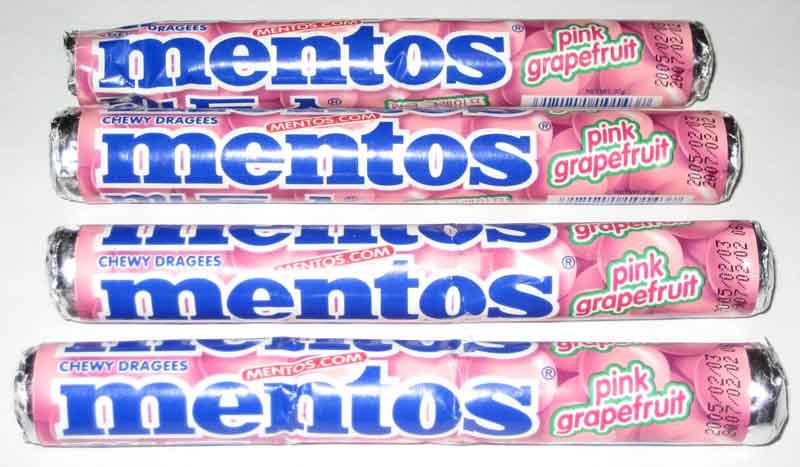
It’s always exciting when one of my Mentos ambassadors brings me a new shipment. I just got a big one courtesy of Mentos Ambassador King who just got back from an extended trip in the far East. Included in her big bag of wonderful foreign Mentos were a few fun surprises.

grapefruit.jpgwrappers.jpgsour.jpg

The first few pulled out of the package were grapefruit flavored which I have been able to find locally on a few odd occurrences. There were a few more that came in double-wrappers: lime mint, red orange, strong mint. The last bunch was sour mix, which I’m guessing is very similar to the US sour rolls. They do list different flavors than the US sour though. These rolls have grape, green apple and pineapple, where the US sours have watermelon, apple, and lemon. Since ther are more than one roll of these, I’ll be able to give them a try and see what these different flavors are like. Maybe I’ll post an update later on how these babies taste.

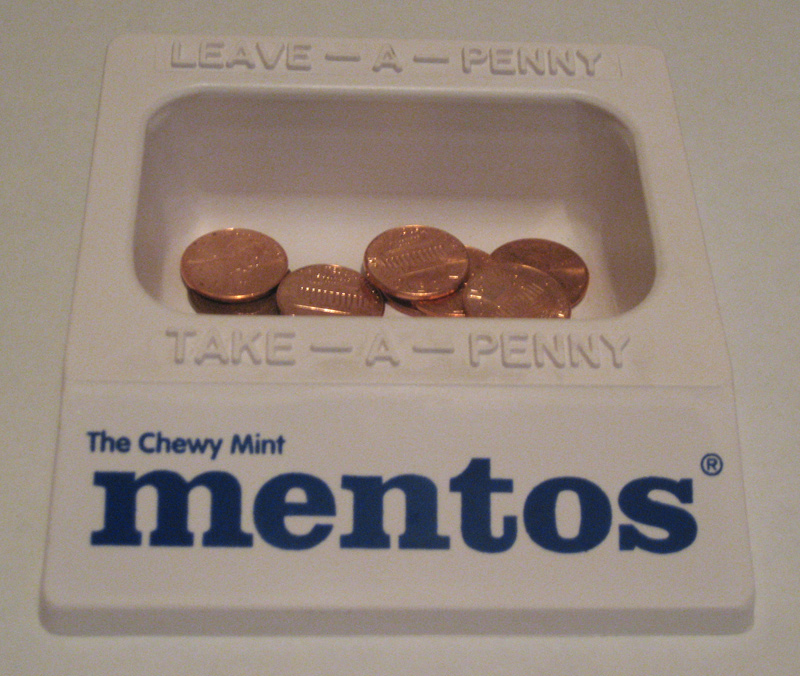
Mentos Penny TrayIn addition to a nice collection from my Mentos Ambassador, I also was able to add to my collection of Mentos memorabilia with a Mentos branded “Leave-a-Penny, Take-a-Penny” tray. It’s a lovely piece, so now when you come to visit me, and you need to pay me $2.01 and all you have is a twenty. Feel free to take a penny from my Mentos penny tray so you don’t get a pocket full of change back.

Geotagging Back in Flickr

Flickr LogoIt looks like geotagging is back in Flickr. This time it’s built right in vs. the older method that died off a little while back. With the new built-in geotagging, flickr has provided a handy drag and drop interface from the organizr section of your flickr account. You simply zoom to the place on the map where you want your photo to display and drag the thumbnail to that location. There is no more messing with longitude and latitude in the comment and tag fields of your photos. If you still have lon/lat tags from the older geotagging method, flickr prompts you to import all of those photos to their new setup, so you don’t have to go back and remap all of your previously geotagged photos. If you want to just look through the map, you can access it via the flickr explore menu. The maps are now generated via Yahoo maps (makes sense now that Yahoo owns Flickr). Apparently in the next few weeks they’ll be opening up the API’s for this service so hopefully we’ll see some cool new apps based on this new feature. I’m also hopeing someone figures out how to make a Google Earth plug-in for this as well since that was the way I used to access the geotagged photos. I guess we’ll wait and see what happens with this service.

There is a lot more information, including a few screencast sessions, about the new flickr geoblogging on the FlickrBlog

Super Smash Flash

Super Smash FlashEver wish you could pit your favorite old-school video games characters against each other? Ever wondered what it would be like if the Metroid man woman were in a battle to the death with Mario, or what would happen if Sonic the Hedgehog were to fight Link from Zelda? Well, wonder now more… Super Smash Flash is a flash game that lets you throw old-school video game characters into battle with each other (street fighter style).

More Flickr Tools

FlickrDo you use Flickr? How about some fun tools to make it easier.

FlickrStorm
FlickrStorm is a better search for Flickr. It digs a little deeper than the built-in flickr search to bring you more relevant results

Flickr Leech
Their motto is “because paging sucks.” This tool helps you sort through the millions of images on Flickr by letting you filter what you view, and by letting you view a LOT of thumbnails on one page without having to go page by page as in Flickr’s interface.