Have you ever been curious what you’d look like as a Lego character? Well, the wait is over… you can find out here!
Here’s the outfit I’d wear to Lego Land.

Have you ever been curious what you’d look like as a Lego character? Well, the wait is over… you can find out here!
Here’s the outfit I’d wear to Lego Land.
 Does anyone remember the old mp3.com? Not the current version of the site that was bought out by c|net… which is nothing like the original. Mp3.com was started by Michael Robertson in 1997 as a portal for the growing mp3 format. It became a very popular site showcasing new and unknown artists. All of the content on the original mp3.com was provided by individual artists. In November of 2003 c|net purchased mp3.com and changed it from a network of independent artists’ music to a directory of music. Much of the old content from the original mp3.com is still available at a site called garageband.com. Garageband has the old archive of mp3.com content (those they were able to get permission from the original artists to host) and provides the same music hosting service for independent artists to host their music. It’s nice that a partial legacy of the old mp3.com still lives on, but nothing really touching the glory days that the original celebrated during the dot com boom.
Some articles on the history of mp3.com:
Mp3.com – We Made History
Michael Robertson and MP3
 I’m a little late getting this posted, but I was able to see one of the new Mac Minis in person last weekend at Apple store in the Jordan Creek Mall in Des Moines. Like most Apple products, the pictures online just don’t do them justice. The mini was just that… mini. It is seriously about the size of an external hard drive and fits right in your hand (not that you’d really ever need to hold onto a desktop computer) It was a little shinier on top that how it looks in the pictures. I thought it would be closer to the iMac matte white, but it’ a little shinier than that (not a complaint just an observation). It is still one tiny little computer.
I was also able to take a look at one of the new iPod shuffles in person. They are also much smaller than I expected. It is seriously about the size of a standard usb pen drive with a little track control button on it. I think it’s a good idea for Apple to make a less expensive iPod, and I’m sure they’ll do very well with them, but I don’t think I’d buy one. It really is the lack of a screen that kills it for me. I would just like to know what’s playing and where I’m navigating. Otherwise this is a slick little mp3 player.

In putting together an RSS presentation and threw together a bunch of resources that I thought might also be relevant here.
What is RSS?
Rich Site Summary
Really Simple Syndication
RDF Site Summary

RSS is an XML format used for syndicating regularly updated web content (headlines, news, blog posts, etc.).
Resources defining RSS:
Wikipedia
Answers.com
Webreference.com
XML.com
Intro to RSS for Educational Designers
How Do I Read RSS Feeds?
The RSS feeds themselves aren’t meant to be read by humans. Programs called aggregators (both software and web-based) can decipher the XML code into something that is easy to read and easy to manage. Aggregators can hold and display multiple feeds making it easy to check out the content from your favorite sites without actually having to visit every single site by itself. The aggregator automatically checks the RSS feeds that you are subscribed to and tells you when there has been new content posted. So, those 15 sites that you check every day used to take 15 or more separate clicks now only takes 1 click (plus, you don’t have to put up with all of the pop-up ads, annoying colors, tiny font faces etc. that you would by visiting the site).
Popular Aggregators:
Collection of popular aggregators
Most used aggregators
Bloglines (web-based aggregator)
Feedreader (free/open source PC aggregator)
NetNewsWire (Mac OS X – $39)
Firefox (livebookmarks included w/free browser download)
Sage (free plug-in for Firefox browser)
Pluck (free IE and Firefox plug-in)
Lektora (free IE and Firefox plug-in)
SharpReader (free PC aggregator)
NewsGator (both web-based and MS Outlook plug-in $29)
FeedDemon ($29.95)
Where do I find Feeds?
RSS feeds are becoming more and more popular as more people start to use them. There are several sites that catalog RSS feeds based on subject.
Syndic8
Technorati
Feedster
Bloglines also includes a large list of feeds to subscribe to.
How Do I Add an RSS Feed For My Content?
Many blogging tools have RSS feeds built into them. A free, easy-to-use blogging tool is Blogger. Otherwise these articles will get you started adding a feed to your existing content.
Orisinal : Morning Sunshine is a great collection of flash games. This site has been around for quite some time. I think I ran across it for the first time about 3 years ago, and just recently ran across it again. The games on this site aren’t your typical flash shoot-em-up games that are found all over the internet. These games are very elegantly done and the content and game-play are very original. I find myself drawn to each one, not just for the unique play, but even just to hear the game’s original soundtracks (which are also great). Ferry Halim , the author of Orisinal, has done some great things with flash and really pushed the medium.

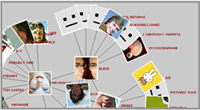 People just keep thinking of cool things to do with Flickr. Marcos Weskamp has taken the Flickr API and put together a cool social networking graph thingy. (great description huh?). What it does is allow you to see the relationship between Flickr contacts. Enter your Flickr e-mail address and it you’ll see a sort of flow-chart showing of your Flickr account and all of your contacts linked from it. If you click one of the contacts, it will then expand showing all of your contact’s contacts etc. etc. Give it a try… it’s pretty interesting to follow your Flickr lineage.
Here is a cool site where someone has done a bunch of time lapse and slow-mo movies of common objects.
I think my favorite is the ice sculpture (the sounds are great!).
 You knew it was just a matter of time before Google got into the online maps and directions business (especially with their Google Local tool and thier purchase of keyhole last year). They have officially released (in beta) Google Maps with a slick interface that you would expect from the search company. They have done a few things different than most of the mapping sites out there. Google Maps allows you to click and drag the map instead of clicking and waiting for the site to refresh.
This quick tour of the new mapping site gives a good overview of the features.
In the short period that I’ve been playing with it, Google Maps has already become my favorite online mapping tool. I love the click and drage feature. It’s extremely intuitive and just a whole lot easier to use than any of the other tools out there.

 If you stopped by looking to find the brilliant ramblings that make up techory.com any time later Saturday night through Sunday afternoon, you may have noticed an error message… and no techory.com. That is because I single-handedly destroyed the site on Saturday night. I was doing some cleaning on the site, removing some items that I hadn’t used for a while, and accidentally deleted some other vital files including pretty much the entire blog. Oops! Plus, to make matters worse, I hadn’t made a backup. Double-oops!
I was fortunate to find some old copies of the vital files on another computer in my Dreamweaver local site… whew! Functionality to the site was back! I was still missing a bunch of images from posts… images that I didn’t have any more. I mean, what could possibly happen to them once they were uploaded? They’ll be there forever! I was lucky to find a Google cache of my site with a good portion of the images still in tact… whew again!
So as far as I can tell, it looks like I dodged the bullet getting everything back up again. If you notice anything funny with the site let me know. So what lesson have we learned? BACKUP! BACKUP! BACKUP!
Who needs the new iLife ’05 when there is iLife ’84 !
Hopefully you’ve got a machine the can run it.
System Requirements:
Check out that resolution!
Good ole Microsoft has officially launched their search tool:
http://search.msn.com
The results seem pretty solid, but I think I’ll stick with Google for the time being.
 While reading a post from YourTotalSite.com about web designers not marking their PDF files, so you inadvertently click a link having to wait for the
 excruciatingly slow PDF plug-in to open. One of the comments recommended a Firefox plug-in called TargetAlert which will add a little icon beside all links to external documents (Word, Excel, PDF, mail, etc.). It’s a pretty handy extension.
Whenever you load a web page that has a link to a file that ends in .pdf, TargetAlert will append an Acrobat icon to the end of the link. Thus, a link that normally looks like this:
Will look like this when using TargetAlert:
Sample Link to a PDF
I even found a way to change the icons that display for certain documents. It’s a little involved… (more…)
 While playing around with an alternative search engine (defined as anything that’s not Google), I did a video search for… you guessed it, mentos! It came back with a rather humorous video from some guys named Jay & Jon.
Jon and Jay’s Mentos Commerical (QuickTime Movie)
They also have some other videos on their site that somehow sucked me in an made me watch.
 Google released a beta of their new TV/Video search yesterday. This new search allows you to search the content of recent TV shows. Your results will be presented with thumbnail images of the show along with a short transcript of the clip.
I did a quick search for mentos, and it seems like they’ve used some sort of computer transcription for capturing the spoken content which isn’t quite 100%. Much of the content for “mentos” looks like it should have been for “mementos.”
This looks to be a cool tool none-the-less. I’m sure Google will continue to tweak it adding more and more features like they seem to do with many of their products.
UPDATE: I just read another story about this new search, and learned that Google is just using closed caption information for the search result transcripts. Does that mean that the closed caption people are putting in mentos instead of mementos?
 Ever wondered what you’d look like as an ape? The Perception Laboratory’s Face Transformer is a java application where you can upload a picture of yourself and then do all kinds of cool stuff to it. You can transform your face into all sorts of different forms:
I found that it works best with a straight-on head and shoulders picture with a dark background.


