2010 Holiday Gift Guide

Another year has come and gone, and with it, comes another iteration of my holiday geek gift guide. The gift lists are chosen because they appeal to me, and the people I shop for. Feel free to let me know if I’ve missed any lists that you find helpful, and I’ll ad ’em to the post.

(Guides from previous years: 2009, 2008, 2007, 2006, 2005, 2004)

A Tiny Lens for my Camera Phone

I got a present in the mail yesterday straight from China. The tiny little macro/wide angle lens I purchased had finally arrived (apparently free shipping from China takes a while). Yes, you read that correctly. I purchased a lens for the crappy camera on my phone. I figured this was a $10 experiment to see if a lens for a camera phone would actually work, and surprise-surprise, it doesn’t do too bad of a job.

The lens came in a blister pack which included the actual lens, which is pretty sturdy with a metal housing. It also includes a lens cap and a little magnetic bottom cap with a tiny lanyard on it. The way the lens works is by attaching to the back of your phone with a small magnet ring around the bottom. If your phone doesn’t have anything for the magnet to stick to, they include two small metal rings (like little tiny washers) with peel off adhesive on them that you can stick to the back of your phone. I ended up sticking it to the case I have over the back of my phone. The lens itself is made two pieces screwed together that change depending on the type of photos you want to take. The lower, smaller piece is the macro lens, and the upper wider piece, when screwed on is the wide angle.

I was somewhat skeptical of how well a lens for a camera phone would work, but have been pleasantly surprised with my experiments. I started with a few macro shots and it does a pretty nice job. See the examples below. I took some shots of a few small items I had laying around. For the macro shots, I took a normal shot of the Old Capitol, then one with the wide angle lens. The wide angle shots aren’t as nice as the macros, but all in all, it’s a nice little tool to have.

If you want to own one of these yourself, I bought my from Deal Extreme, but they are all over ebay as well.

MapCrunch (random teleportation)

Do you want to take random trips around the world (via Google Street View)? MapCrunch allows you to teleport around the word to some pretty beautiful places on Google Street View. It also looks like you can submit you own cool places via Twitter (@mapcrunch) to be the “View of the Day” on MapCrunch. I also like putting it into slide show mode and hitting the full-screen button in the corner. Someone needs to figure out how to make a screensaver out of this.

Maybe artist Bill Guffey can use this site to help him find places to paint.

MapCrunch - Random Google Street View

It only took me about 25 tries to find a shot from Iowa.

Remote Controlled Ghost


Warning: Undefined property: stdClass::$pageInfo in /home/techoryc/public_html/blog/wp-content/plugins/fluid-video-embeds/fluid-video-embeds.php on line 681

Warning: Attempt to read property "totalResults" on null in /home/techoryc/public_html/blog/wp-content/plugins/fluid-video-embeds/fluid-video-embeds.php on line 681

Happy Halloween a bit late. Did you get a lot of candy two nights ago? Michael at Utah Aerials was dive bombing kids as they collected Halloween candy with his homemade remote control Ghost (which he lovingly named “Mr. T”). Take a look at his construction video.

I think he needs to make a flying turkey for Thanksgiving, and a flying Christmas Tree, for Christmas. There needs to be a mini helicopter character for every holiday!

Old Smartphones

I ran across an article yesterday that took me for a little trip down smartphone memory lane: From Brick to Tile: We Look Back at a Decade of Smartphone Evolution

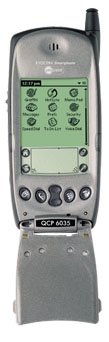
Kyocera 6035

Kyocera 6035

The article walks through a brief history of smarphones, starting around the year 2000 and moving to recent phones dominated by Android and the iPhone. This little write-up reminded me of my own smartphone past. I’ve not owned anything other than a smartphone starting with my very first cellphone, the Handspring Treo 300 back in 2003, which was not only my first phone, but also my first cell phone service. I remember doing a lot of research before jumping into the cellphone world, and had my eye on several phones at that time. I remember following a couple Kyocera phones before going pulling the trigger on a purchase. The first one I remember looking at was the Kyocera6035, which was a black and white Palm PDA in the form of a phone (it was big!), and then shortly after that, the Kyocera 7135, which had a much more compact flip phone form (and a color screen!). I can also remember keeping a close eye on the Danger Hiptop (later named the Sidekick), which was a pretty cutting edge phone at that time. I ultimately settled on a Handspring Treo 300 (pdf) as my entry into the smartphone revolution. It was a great little phone, and I loved being connected to the internet wherever I was at.

It’s been interesting to watch where things have gone since the early smartphone days, and as they become much more common, it will be fun to see what the future holds.

Mentos Media Winning Awards

A couple pieces of Mentos media (a video and comic) have been in the news the past few days for  winning a couple awards.

The first is from a Mentos Fresh Goes Better contest on deviantART. The contest provides a template with a “before Mentos” box on the left, and an “after Mentos” box on the right.

Everyone knows Fresh Goes Better with Mentos, but did you know that since 1991 they’ve also made countless situations better? That’s right, the simple act of popping a single Mentos mint into your mouth, helps enhance and improve circumstances and events of all kinds. The equation is simple. Bland, boring, and average quickly become flavorful, exciting, and amazing once Mentos enters the mix. Help make your day great with the addition of Mentos!

You can view contest entries in this deviantART collection. An artist form Wilsonville, Oregon looks to have won 2nd place in the contest.

The second Mentos award was from UTalkMarketing.com for a Mentos commercial where a spider does some unexpected things which is supposed to represent the predictability of a roll of “Mentos Rainbow” candy. You know what’s going to come next since they follow the colors of the rainbow.

http://www.youtube.com/watch?v=rMVMzzWPDSk

e7 Flash Game


Warning: Undefined property: stdClass::$pageInfo in /home/techoryc/public_html/blog/wp-content/plugins/fluid-video-embeds/fluid-video-embeds.php on line 681

Warning: Attempt to read property "totalResults" on null in /home/techoryc/public_html/blog/wp-content/plugins/fluid-video-embeds/fluid-video-embeds.php on line 681

I just ran across a fun new flash game by Jonas Richner. The game is called e7, and even though it’s nothing elaborate, it really pulls you in. You’re goal is to save the earth…

“It’s force is huge
Earth will be dust”

You’re dropped off in a pod of some sorts by your spaceship onto a planet which is kind of acts like big bowl of jello. It shifts and pulls based on how you move your pod over it. Your missions is to head east and find a missile pointed at earth. You need to navigate your pod through the planet avoiding obstacles and enemy ship lasers. Your weapon is your pod which you use to smash enemies by jumping and bouncing off of hills and valleys on the planet. It sounds simple, and looks simple, but really is a beautiful game. The soft soundtrack rounds everything out nicely and puts you into the world of the game.

Play e7

CrosT Application for WebOS

For the past several months, I have been working with a colleague of mine (Matt) on a mobile app for WebOS (Palm Pre and Palm Pixi).  It started with an idea from Matt’s wife while they were waiting at the port of entry in Nogales to cross the border back  into the US while visiting some family in Mexico. If you’re unfamiliar with crossing the border, it can take a very long time just sitting in a long line of cars waiting. The idea was to create a mobile app that you could look up the current wait times at any port of entry into the US (we added Canada too). This issue we got the ball rolling on an application called CrosT.

We decided to jump into this app using WebOS since it had a pretty simple, straight-forward development environment. The end product we came up provides quick access to current border crossing times (commercial, passenger, or pedestrian) into the US from Mexico or Canada, or into Canada from the US. CrosT will also provide a listing of the nearest ports of entry to your current location, using your device’s built-in GPS function. If you have a WebOS device, and a need for quick access to border crossing times on your WebOS device, give CrosT a download.

CrosT provides border wait times for entry into the United States and Canada conveniently formatted for your Palm Pre or Pixi, in the NAFTA zone language (English, French or Spanish) of your choice. CrosT can also tell you where the nearest crossing is and allows you to bookmark the reports you most frequently access for quick review. CrosT is the only application available for WebOS that provides this information for both the northern and southern borders of the United States in all NAFTA zone languages.

CrosT is the first of what will hopefully be a series of mobile apps we create. As we develop more apps, we’ve set up a small company called Pivotal Cog to serve as a central point for our future development.

Mentos & Diet Coke World Record Broken Again

The Guinness World Record for Mentos and Diet Coke has been broken yet again, this time by the Tour College of Changchun University in China. The previous record was set by Turbia University for 1911 fountains. The new record was set with 2175 fountains.

“We ordered 2,450 packs of sweets from a local supermarket, and the day before the event, we had to unwrap them all, put them on skewers and then wrap them again to stop them melting in the heat.”


Mentos Powered Rocket Car


Warning: Undefined property: stdClass::$pageInfo in /home/techoryc/public_html/blog/wp-content/plugins/fluid-video-embeds/fluid-video-embeds.php on line 681

Warning: Attempt to read property "totalResults" on null in /home/techoryc/public_html/blog/wp-content/plugins/fluid-video-embeds/fluid-video-embeds.php on line 681

Those crazy guys at Eppybird have done it again. They’re the guys who brought you the amazing Mentos fountains. This time around they’re using Coke Zero (apparently it works as good as Diet Coke) and Mentos to make a rocket car. 108 bottles of Coke Zero and 648 Mentos propel the car (and driver) 212 feet. One word… awesome!

(you can also check out their early experiments)

Super Mario Crossover

Have you ever wanted to run your favorite old-school Nintendo characters through the original Super Mario Brothers? Well wait no more, you now can with Super Mario Crossover. You have a choice of Mario, Link from Zelda, Bill R. (didn’t know that was his name) from Contra, Simon from Castelvania, Mega Man or Samus from Metroid. The great thing about using these other characters, is you get to use their own weapons instead of just jumping on things with Mario. The author of the game says:

This is my first game, and I have worked on it for over a year. It has been a long journey, but I think you will see that all of my effort has paid off. I have recreated the entire game of Super Mario Bros, but now you can play as different characters. Each character plays just like they do in their original games with a few modifications to make the experience better.

This is my tribute to classic NES games, and anyone who grew up playing Nintendo should enjoy it. Now please enjoy the hell out of this game and experience Super Mario Bros in a whole new way!

And yes, I know that controlling Simon Belmont in the air isn’t easy, but that’s what makes him special. And he can double jump to help you control it a bit more. 😉

I highly recommend playing this with a gamepad if you have one, but you can still enjoy it with a keyboard.

Go take it for a spin (newgrounds.com), it’s fun to play an old favorite game from a different perspective.

David After Dentist: Family Video to Viral Sensation


Warning: Undefined property: stdClass::$pageInfo in /home/techoryc/public_html/blog/wp-content/plugins/fluid-video-embeds/fluid-video-embeds.php on line 681

Warning: Attempt to read property "totalResults" on null in /home/techoryc/public_html/blog/wp-content/plugins/fluid-video-embeds/fluid-video-embeds.php on line 681

Warning: Undefined property: stdClass::$pageInfo in /home/techoryc/public_html/blog/wp-content/plugins/fluid-video-embeds/fluid-video-embeds.php on line 681

Warning: Attempt to read property "totalResults" on null in /home/techoryc/public_html/blog/wp-content/plugins/fluid-video-embeds/fluid-video-embeds.php on line 681

Tuesday, March 16, 2010
Presenter: David DeVore – David After Dentist

Description: What motivated our family to post the first “David After Dentist” video. What was our reaction to the video going viral — and why we decided to embrace the massive popularity. How David has reacted to all the attention and how we have tried to control his exposure. The negative aspects and how we chose to handle it. Learn all this and more at this fun-filled session!

The video has been viewed over 54 million times today.
YouTube said that this was the 2nd most viewed video after Susan Boyle.
On the Tosh.0 show

How did this happen?

  • They did it because David’s mom couldn’t be there. Dad stays at home and had to take David to the dentist.
  • David would get very nervous about the dentist (7yrs old).
  • Decided to use flip cam to show David his nervousness was worse than the actual event, and to show Mom. The plan was to record the whole day.
  • It was originally shown to just family and friends (email or at home).
  • Got into Facebook later, and posted to wall. FB friends really liked it.
  • Feb, ’09 it got posted to Youtube to make it easier since other’s wanted to see it. It was made public.
  • David was asked if he was OK with it being posted for public view, and he was OK with it.
  • The night it was posted it had 10k views… shocked.
  • Radio shows picked up on it the following Monday morning. They did a lot of radio interviews. They started pulling it up on YouTube after hearing on radio. The following day it was up to 3 million views.

Were we OK with this many people seeing it?

  • Are we OK with this? Was David OK with it?
  • We’ll make a family adventure out of this and see what happens.
  • Nothing has happened that the family hasn’t been comfortable with.

Jimmy Kimmel – Tosh.0 – Other features

  • ABC/Disney wouldn’t allow Jimmy Kimmel to use it because of the subject matter.
  • The family was able to go out and warm up the audience even though they couldn’t be on the show.
  • Were able to go to Disney World and get a photo with Dentist Mickey and Minnie
  • Went on Tosh.0, and did a portion of that show.
  • Super Bowl Commercial – hired an actor to recreate video with Beyonce.

Parodies

Controversy

  • People thought dad drugged David, or the car was moving.
  • Chicago Sun Times wrote a scathing article about the video – her daughter showed the author the video.
  • The popularity of the video jumped after the article (Today Show, Tyra Banks, Bill Oreily)
  • Took off outside the US as well.
  • David has been protected from much of it. The TV was turned off. An awards show wanted to use part of it, but they turned it down.
  • David Loves In-N-Out Burger!!! (smart kid!)

Monetization = Paying for College

  • Maybe they can buy a bike or video games, and it grew.
  • Maybe they can pay for college or even the other children.
  • That would be the best thing to get out of it.
  • They’ve been able to do some charitable things, and show David about doing good things.
  • Majority of the money is from the YouTube partner program (ad share). Sometimes there will be a sponsored ad on another page.
  • Visio commercial licensed the video.
  • They’ve turned several down, and some companies have also turned down using it.
  • Europe and Australia have used the video for several shows (license fee).
  • Doctors and Dentists have approached as a funny opening, or also as part of an education program showing effects of anesthesia. Harvard used it in some current events class.
  • Licensing was a challenge (legal documents) – Hollywood is used to paying very little money with very strict legal requirements. America’s Funniest Videos owns the video forever whether they use it or not.

Family Business

  • Tshirt and promotional material is all done at home.
  • New logo created by Genine Shafer
  • Brand new website went live last night (http://davidafterdentist.com) – over 100,000 new video views a day.

“It’s just really cool to be a part of something like this. The positive comments from people are great.”

Questions:

  • What was the first trip back to the dentist like?
    The surgeon that did it didn’t want to have anything to do with it. The regular dentist loves it, and has been very nice about the whole thing.
  • How

Cracking the Books ‘ User-Generated Content in Education

Tuesday, March 16, 2010
Presenters:
Clyde Boyer – Trinity Education Group
Ron Reed – RL Reed Consulting
Anita Givens – Texas Education Agency
Margarita Pinkos – MPinkos Education Consultants

Description:
"Age considers; youth ventures." This aphorism has never seemed more real than in a typical U.S. public school classroom: the students are operating on several levels simultaneously in media-saturated environments, while classroom teachers and publishers all seem to be standing on the sidelines, trying to catch up.

Canon YouTube Video put together by a student in Korea. Hundreds of people have learned to play this song just by this video. This is a very atypical learning (informal) learning environment.

Type 3 words into YouTube for what you’re trying to accomplish. Search for "Graphinc Linear Equations." Students post comments thanking the poster for putting the information online. Same "think you" comments from GED test-taker as well as an honors math student.

Education Trends:

  • Mobility
  • User Created Content
  • Learning Communities (youtube, facebook, social netoworking"

Culture eats strategy every day of the week.
What is the culture of these user-created learning content?

Vinton Cerf was the hero of a dark world (father of the internet)

  • All these computers in the world, but they can talk now!
  • Learning: Change = opportunity

Connections System from Rice University (http://cnx.org/)

  • CMS for educational content
  • Repository of that educational content
  • Spreads the content in various different ways (online, mobile, hard copy textbook).
  • Over 15,000 modules woven into nearly 1000 collections
  • Everything is modularized for repurpose if needed, update a module at a time, not the entire book.
  • Openness – everyone can create content! Unfortunately not everything is wonderful because of this. How do you maintain quality? Lenses.
  • Lenses – allowing for the good quality people to endorse good high-quality content.
  • Frictionless Remixing – you can put in new stuff whenever you want or need (xml and OAI). Everything is Creative Commons based licensed.
  • Customization – lightweight branding vs. full-scale branding in your own window. Zoning – community can rope off areas (k-12 doesn’t need to see medical content). Enterprise Rhaptos – states can run their own version of the software.
  • Textbooks are still the #1 way of learning in the US. Technology isn’t always available to move away from that.

Ning Network (http://www.ning.com/)

  • Build your own social network around whatever areas you need.
  • Over 1,400 educators are sharing information and practice in this network. "You met each other once at this event, come back and share more."
  • Share what you’re doing in the classroom with other teachers.
  • Mentoring happening, Find out what works and doesn’t work.
  • No course management system from Ning, so the system is still evolving.

Second Life

  • Set up a virtual island in Second Life.
  • For teaching ready to be on the cutting edge, this works really well.
  • It’s like a webinar with an avatar.

Design

  • A design asks questions, "what problem are we solving?"
  • What are we solving with open source textbooks? What do textbooks solve?
    It’s a pathway to literacy.
  • The most telling thing we’re solving with open source textbooks is cost. States don’t have a lot of money right now. Many changes are, and always will be driven by cost.
  • Not only is the cost lower for these textbooks, but many times the quality is higher.
  • Challenges: How do you get textbooks? Vetting sometimes lowers the quality of textbooks. Looking at this… do we even need textbooks?
  • What if we allow students and learning groups to define their own resources? Kids can structure their own resources.
  • Textbooks are written for the classroom (one single source) and NOT for students. A single student will have issues accessing that only source.
  • Students will probably figure things out before we (educators) do.

What states are doing the best job leveraging the best learner created content?

  • Texas is going a pretty good job. There is an open-access education initiative that puts Texas in the forefront because it allows open content to be used as the primary text. California allows it to be used, but only as a supporting text.
  • Open texts are being taken on world-wide – China, Brazil. There are many forces against it in the US.
  • The access to technology in large enough numbers may be limiting this too.

What’s being done to incent people to contribute

  • Give teachers professional visibility (teachers are busy).
  • Add e-commerce system to the system, and add some sort of payment. Trade funds for creation and/or use. What about .99 for a lesson plan (ala Apple)?
  • If you publish in an open setting, you’re more likely to get it used world-wide – tenure calls for this.

Mobile Content is Social

Tuesday, March 16, 2010
Presenters:
Tom Watson – Facebook Inc
Justin Shaffer – Hot Potato Media Inc
Michael Sharon – Facebook Inc

Description:
This whirlwind tour through various interaction models, content strategies, use cases and interface tweaks will be peppered with anecdotes, secrets and tips to help you create addictive social experiences on mobile. You’ll hear from Michael Sharon and Tom Watson of Facebook, and Justin Shaffer of Hot Potato.

One theme has changed mobile content over the last few years

  • Touch – changed the game.
    1.) size – bigger is better, the keyboard/buttons are gone
    2.) intimacy – you can play with this big touch screen and just tap to interact just by using our fingers.
    3.) control – we’re good at using our fingers to interact with things
  • Speed
    1.) hardware – the amazing advances recently in hardware.
    2.) software – you can get new apps, you can put stuff in the clouds
    3.) perception of speed – software taking advantage of hardware.
  • Cheating
    the network cloud isn’t as fast as it should be. New API’s and dev techniques make the device feel more responsive.

Is Mobile Content More Social?

  • Mobile content isn’t inherently social (you stand by yourself and check your phone).
  • Report: "90% of waking hours spend staring at glowing rectangles." -the onion

What does it mean to be social?

  • You want to talk/interact… people to see your stuff.

How do you facilitate this?

  • Friends
    Include your friends in your device (facebook mobile site). Facebook defaulted the view to order by recent activity. You don’t have to search for a way to be social.

    Address/Contact list in your mobile device: It’s not very social – awkward to add/edit in your device. Create a pure managed address book. Blackberry pulled in facebook info to the address book. Palm Pre created the unified address book by pulling all this contact information together. iPhone syncs photo/phonebook onto phone from Facebook.

    Doodle Jump uses Facebook Connect to provide a social graph/connections into any applications.

  • Notifications
    Active notifications (pay attention to now) or Passive (I’m interested in seeing what has been updated.
  • Sharing
    Photos are a big key to sharing (Facebook). Make it as easy as possible to get a photo into the cloud and tag/describe, making it even more social. Facebook app uses the type-ahead for tagging, making the barrier even smaller to get info in as quickly as possible.
  • Serendipity
    Having a connected device with you al the time, you can post different types of content as well as geographic information. You can see what is nearby your current position (Gowalla & 4Square).
  • Discovery
    You can get a different context for different places and times. Do I want to communicate or just see what people are saying? You can filter a larger audience and get information that is relevant to you.

    Facebook news feed exposes the popular things, and not everything, or just your own things.

  • Control
    Gowalla, Hot Potato, 4Square: all of these show location content. They all allow you to post to twitter and facebook on top of the individual app posting. The user can control where they want that information to go (internal or external). You can/should have control to where, but also the ability to remove things.
  • Intent
    Interfaces should be designed in such a way to illicit the response you’re looking for. Quora mobile interface has a bigger check box for mobile (finger click).
  • Feedback
    The link feedback from Facebook makes you feel good when other people comment/link what you post. It makes you come back and post more. It’s a circle that draws you back in and you provide info, and then get feedback, it encourages you to post again. It’s powerful to provide feedback to your users and let them know what is going on.

    4Square badges encourage you to continue using with game mechanics. You want to compete with friends and get more badges.